📦 Collections Framework
Collections are dynamic data structures that store and manipulate groups of objects. Unlike arrays, collections can grow/shrink automatically and provide powerful methods for data manipulation.
- Test Data: Store dynamic test datasets (ArrayList)
- Configuration: Key-value pairs for test config (HashMap)
- Unique Values: Store unique test IDs (HashSet)
- Test Results: Collect and analyze test outcomes
Collection Types Comparison
| Type | Ordered | Duplicates | Use Case |
|---|---|---|---|
| ArrayList (List) | Yes | Allowed | Sequential test data, ordered results |
| HashSet (Set) | No | Not allowed | Unique test IDs, unique browsers |
| HashMap (Map) | No | Keys: No, Values: Yes | Test config, user credentials |
Collections Framework Hierarchy
Understanding the structure of the Collections Framework helps you choose the right collection type for your needs:
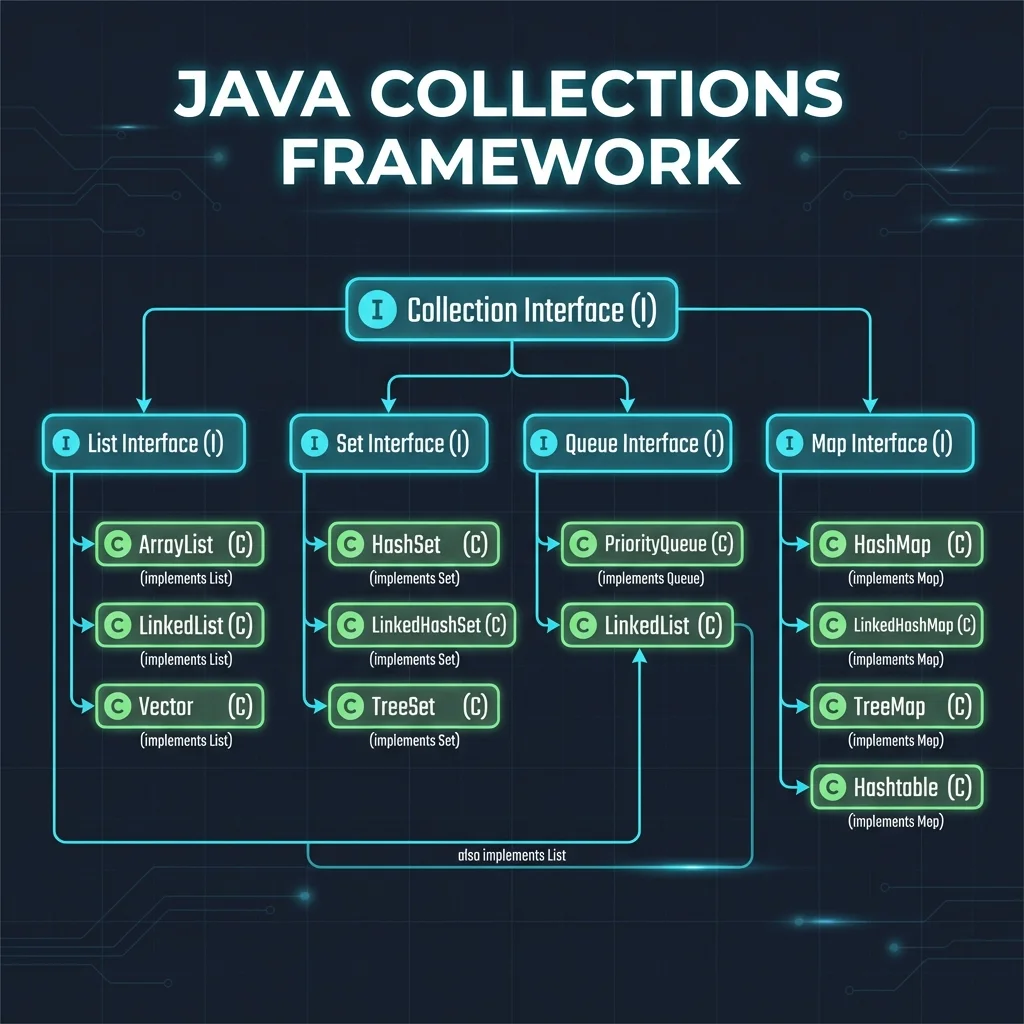
- Collection Interface: Root interface for List, Set, and Queue
- Map Interface: Separate hierarchy (not a Collection)
- Interfaces (I): Define contracts (cyan boxes)
- Classes (C): Concrete implementations (green boxes)
- LinkedList: Implements both List and Queue interfaces
ArrayList - Dynamic Arrays
import java.util.ArrayList;

public class ArrayListExample {
    public static void main(String[] args) {
        // Create ArrayList
        ArrayList<String> browsers = new ArrayList<>();

        // Add elements
        browsers.add("Chrome");
        browsers.add("Firefox");
        browsers.add("Safari");
        browsers.add("Edge");

        // Get element
        System.out.println("First browser: " + browsers.get(0));

        // Size
        System.out.println("Total: " + browsers.size());

        // Remove element
        browsers.remove("Safari");
        browsers.remove(0);  // Remove by index

        // Check if contains
        boolean hasChrome = browsers.contains("Chrome");

        // Iterate
        for (String browser : browsers) {
            System.out.println("Browser: " + browser);
        }

        // Clear all
        browsers.clear();
    }
}
HashMap - Key-Value Pairs
import java.util.HashMap;

public class HashMapExample {
    public static void main(String[] args) {
        // Create HashMap
        HashMap<String, String> testData = new HashMap<>();

        // Add key-value pairs
        testData.put("username", "admin@test.com");
        testData.put("password", "Test@123");
        testData.put("env", "staging");

        // Get value by key
        String username = testData.get("username");
        System.out.println("Username: " + username);

        // Check if key exists
        if (testData.containsKey("password")) {
            System.out.println("Password found");
        }

        // Iterate through entries
        for (String key : testData.keySet()) {
            System.out.println(key + ": " + testData.get(key));
        }

        // Remove entry
        testData.remove("env");

        // Size
        System.out.println("Entries: " + testData.size());
    }
}
HashSet - Unique Elements
import java.util.HashSet;

public class HashSetExample {
    public static void main(String[] args) {
        HashSet<String> uniqueTests = new HashSet<>();

        // Add elements (duplicates ignored)
        uniqueTests.add("Login Test");
        uniqueTests.add("Logout Test");
        uniqueTests.add("Login Test");  // Duplicate - won't add

        System.out.println("Unique tests: " + uniqueTests.size());  // 2

        // Check if contains
        if (uniqueTests.contains("Login Test")) {
            System.out.println("Login test exists");
        }
    }
}
QA Use Case: Test Results Management
import java.util.*;

public class TestResultsManager {
    public static void main(String[] args) {
        // Store test results
        HashMap<String, String> results = new HashMap<>();
        results.put("Login Test", "PASS");
        results.put("Logout Test", "PASS");
        results.put("Payment Test", "FAIL");
        results.put("Checkout Test", "PASS");

        // Count passed/failed tests
        int passed = 0, failed = 0;
        for (String status : results.values()) {
            if (status.equals("PASS")) passed++;
            else failed++;
        }

        System.out.println("Passed: " + passed);
        System.out.println("Failed: " + failed);

        // Store failed test names
        ArrayList<String> failedTests = new ArrayList<>();
        for (String test : results.keySet()) {
            if (results.get(test).equals("FAIL")) {
                failedTests.add(test);
            }
        }

        System.out.println("Failed tests: " + failedTests);
    }
}
Interactive Exercise: Collections
Create a HashMap to store user credentials and ArrayList for test cases:
⚠️ Exception Handling
Exception handling manages runtime errors gracefully, preventing test crashes and providing meaningful error messages. Essential for robust test automation frameworks.
- Element Not Found: Catch NoSuchElementException, retry or fail gracefully
- Timeouts: Handle TimeoutException with custom retry logic
- Test Cleanup: Use finally block to close browsers/connections
- Custom Exceptions: Create TestFailedException for framework
Try-Catch-Finally Flow
Execution Order:
- try: Code that might throw exception
- catch: Handle specific exception types
- finally: Always executes (cleanup code)
Exception handling allows graceful error handling and prevents program crashes.
Try-Catch-Finally
public class ExceptionExample {
    public static void main(String[] args) {
        try {
            int[] numbers = {1, 2, 3};
            System.out.println(numbers[5]);  // ArrayIndexOutOfBoundsException
        } catch (ArrayIndexOutOfBoundsException e) {
            System.out.println("Error: " + e.getMessage());
        } finally {
            System.out.println("This always executes");
        }
    }
}
Multiple Catch Blocks
public class MultipleCatch {
    public static void main(String[] args) {
        try {
            String text = null;
            System.out.println(text.length());

            int result = 10 / 0;
        } catch (NullPointerException e) {
            System.out.println("Null pointer error: " + e.getMessage());
        } catch (ArithmeticException e) {
            System.out.println("Math error: " + e.getMessage());
        } catch (Exception e) {
            System.out.println("General error: " + e.getMessage());
        }
    }
}
Throw & Throws
public class ThrowExample {
    // throws declares method may throw exception
    public static void validateAge(int age) throws Exception {
        if (age < 0) {
            // throw creates and throws exception
            throw new Exception("Age cannot be negative");
        }
        System.out.println("Valid age: " + age);
    }

    public static void main(String[] args) {
        try {
            validateAge(25);
            validateAge(-5);
        } catch (Exception e) {
            System.out.println("Error: " + e.getMessage());
        }
    }
}
Custom Exceptions
// Custom exception class
class TestFailedException extends Exception {
    public TestFailedException(String message) {
        super(message);
    }
}

public class CustomExceptionExample {
    public static void runTest(String testName) throws TestFailedException {
        System.out.println("Running: " + testName);

        boolean passed = false;
        if (!passed) {
            throw new TestFailedException(testName + " failed!");
        }
    }

    public static void main(String[] args) {
        try {
            runTest("Login Test");
        } catch (TestFailedException e) {
            System.out.println("Test Error: " + e.getMessage());
        }
    }
}
QA Use Case: Retry Logic
public class RetryLogic {
    public static void runTestWithRetry(String testName, int maxRetries) {
        int attempt = 0;

        while (attempt < maxRetries) {
            attempt++;
            try {
                System.out.println("Attempt " + attempt + ": " + testName);

                // Simulate test execution
                if (Math.random() > 0.7) {
                    System.out.println("✓ Test passed!");
                    break;
                } else {
                    throw new Exception("Test failed");
                }

            } catch (Exception e) {
                System.out.println("✗ " + e.getMessage());

                if (attempt >= maxRetries) {
                    System.out.println("Max retries reached. Test failed.");
                } else {
                    System.out.println("Retrying...");
                }
            }
        }
    }

    public static void main(String[] args) {
        runTestWithRetry("Flaky UI Test", 3);
    }
}
Interactive Exercise: Exception Handling
Create a method that safely divides two numbers with exception handling:
- Catch specific exceptions first, general ones last
- Don't catch exceptions you can't handle
- Always clean up resources in finally block
- Log exceptions for debugging
🔌 Interfaces
Interfaces define contracts (method signatures) that classes must implement. They enable polymorphism, loose coupling, and are fundamental to test framework design patterns like WebDriver.
- WebDriver Pattern: Interface allows switching browsers (Chrome, Firefox, Edge)
- Page Objects: Define common page actions via interfaces
- Test Listeners: Implement TestNG/JUnit listener interfaces
- Framework Design: Create pluggable components
Interface vs Abstract Class
| Feature | Interface | Abstract Class |
|---|---|---|
| Methods | Abstract (no body) | Abstract + Concrete |
| Variables | public static final only | Any type |
| Inheritance | Multiple (implements many) | Single (extends one) |
| Use Case | Define "can do" behavior | Define "is a" relationship |
Basic Interface
// Interface definition
interface WebDriver {
    void get(String url);
    void findElement(String locator);
    void quit();
}

// Class implementing interface
class ChromeDriver implements WebDriver {
    @Override
    public void get(String url) {
        System.out.println("Chrome: Navigating to " + url);
    }

    @Override
    public void findElement(String locator) {
        System.out.println("Chrome: Finding element " + locator);
    }

    @Override
    public void quit() {
        System.out.println("Chrome: Closing browser");
    }
}

class FirefoxDriver implements WebDriver {
    @Override
    public void get(String url) {
        System.out.println("Firefox: Navigating to " + url);
    }

    @Override
    public void findElement(String locator) {
        System.out.println("Firefox: Finding element " + locator);
    }

    @Override
    public void quit() {
        System.out.println("Firefox: Closing browser");
    }
}

public class Main {
    public static void main(String[] args) {
        // Program to interface, not implementation
        WebDriver driver = new ChromeDriver();
        driver.get("https://example.com");
        driver.findElement("#loginBtn");
        driver.quit();

        // Easy to switch implementations
        driver = new FirefoxDriver();
        driver.get("https://example.com");
        driver.quit();
    }
}
Interface with Default Methods (Java 8+)
interface TestCase {
    // Abstract method (must be implemented)
    void execute();

    // Default method (optional to override)
    default void setUp() {
        System.out.println("Default setup");
    }

    default void tearDown() {
        System.out.println("Default teardown");
    }
}

class LoginTest implements TestCase {
    @Override
    public void execute() {
        System.out.println("Executing login test");
    }

    // Can override default methods if needed
    @Override
    public void setUp() {
        System.out.println("Custom setup for login test");
    }
}
Multiple Interfaces
interface Clickable {
    void click();
}

interface Typeable {
    void type(String text);
}

// Class can implement multiple interfaces
class TextBox implements Clickable, Typeable {
    @Override
    public void click() {
        System.out.println("Clicking text box");
    }

    @Override
    public void type(String text) {
        System.out.println("Typing: " + text);
    }
}
| Interface | 100% abstract, multiple inheritance |
| Abstract Class | Can have concrete methods, single inheritance |
| Use Interface: | Define contract, multiple types |
| Use Abstract Class: | Share code, common base |
🎓 Course Summary
Congratulations! You've completed the Java Fundamentals course for QA/SDET engineers.
What You've Learned
Part 1: Basics & Fundamentals
Part 2: Control Flow & Arrays
Part 3: Object-Oriented Programming
Part 4: Advanced Topics
Next Steps for QA/SDET
- Selenium WebDriver: Web UI automation framework
- TestNG/JUnit: Testing frameworks for organizing tests
- REST Assured: API testing and validation
- Appium: Mobile test automation
- Maven/Gradle: Build and dependency management
- Page Object Model: Design pattern for test automation
- CI/CD: Jenkins integration for automated testing
Practice Resources
- LeetCode: Practice coding problems
- HackerRank: Java programming challenges
- Test Automation University: Free automation courses
- GitHub: Explore open-source test frameworks
- Build Projects: Create your own test automation framework
Final Exercise: Complete Test Suite
Create a simple test management system using all concepts you've learned:
🎉
Congratulations!
You've completed the Java Fundamentals course!
You're now ready to start your journey in test automation.